Forum Articles
  Welcome back Join CF
You are here You are here: Home | Forum | Ubuntu revisited

You are currently viewing our boards as a guest which gives you limited access to view most of the discussions, articles and other free features. By joining our Virgin Media community you will have full access to all discussions, be able to view and post threads, communicate privately with other members (PM), respond to polls, upload your own images/photos, and access many other special features. Registration is fast, simple and absolutely free so please join our community today.


Welcome to Cable Forum
Go Back   Cable Forum > Computers & IT > General IT Discussion

Ubuntu revisited
Reply
 
Thread Tools
Old 20-03-2009, 10:27   #1
zing_deleted
Guest
 
Posts: n/a
Ubuntu revisited

Ok thought I would give it a bit of a chance seeing as its been quite a while since I last got anywhere with it.

Downloaded and installed using the within windows option and I have to say I am surprised. The proprietry ATI driver was easy to find and it installed itself it has the control panel and does appear to take on my screen projector and tv. The network just worked which is good as does the sound. Open office is already installed and I have access to my media etc.

Problems for the basic use option are only 2.

1 Video playback is choppy using the default player there isnt another one installed what should I use and how do I go about installing it

2 Audio for it to be fully working I would need to send audio out via speakers and sometimes through spidif I can not seem to find enough audio options any ideas?

I am getting hold of a job lot of PIII laptops 850 mhz 256 meg ram being lowest spec some will be better and I am thinking about installing Ubuntu onto them as it does seem a viable option which a year or so ago I would not have considered (bet some of ya are shocked or what lol )
  Reply With Quote
Advertisement
Old 20-03-2009, 13:53   #2
Aragorn
Inactive
 
Aragorn's Avatar
 
Join Date: Apr 2004
Location: Minas Tirith, Gondor
Age: 60
Posts: 3,458
Aragorn has a nice shiny star
Aragorn has a nice shiny starAragorn has a nice shiny starAragorn has a nice shiny starAragorn has a nice shiny starAragorn has a nice shiny starAragorn has a nice shiny starAragorn has a nice shiny starAragorn has a nice shiny starAragorn has a nice shiny starAragorn has a nice shiny starAragorn has a nice shiny starAragorn has a nice shiny star
Re: Ubuntu revisited

Not sure about the audio on Ubuntu, but VLC should work fine on there. http://www.videolan.org/vlc/download-ubuntu.html
Aragorn is offline   Reply With Quote
Old 20-03-2009, 13:55   #3
Fatec
Inactive
 
Join Date: Jul 2008
Location: In a pretty place.
Posts: 621
Fatec is a splendid one to beholdFatec is a splendid one to beholdFatec is a splendid one to beholdFatec is a splendid one to beholdFatec is a splendid one to beholdFatec is a splendid one to beholdFatec is a splendid one to beholdFatec is a splendid one to beholdFatec is a splendid one to behold
Re: Ubuntu revisited

As said above your better off installing VLC, or MPlayer.

Ubuntu wont run well on 256MB mem, you'd be better off installing debian + lxde on those.

As a sidenote i'd recommended installing the JFS file system for a huge speed boost, ext3 is really slow.
Fatec is offline   Reply With Quote
Old 20-03-2009, 13:57   #4
Aragorn
Inactive
 
Aragorn's Avatar
 
Join Date: Apr 2004
Location: Minas Tirith, Gondor
Age: 60
Posts: 3,458
Aragorn has a nice shiny star
Aragorn has a nice shiny starAragorn has a nice shiny starAragorn has a nice shiny starAragorn has a nice shiny starAragorn has a nice shiny starAragorn has a nice shiny starAragorn has a nice shiny starAragorn has a nice shiny starAragorn has a nice shiny starAragorn has a nice shiny starAragorn has a nice shiny starAragorn has a nice shiny star
Re: Ubuntu revisited

This might help on the sound front.
Aragorn is offline   Reply With Quote
Old 20-03-2009, 14:04   #5
zing_deleted
Guest
 
Posts: n/a
Re: Ubuntu revisited

got vlc player install but it didnt fix the choppy video Im guessing gfx driver issue got the new ati for nix but am clueless on installing it lol
  Reply With Quote
Old 20-03-2009, 14:09   #6
Raistlin
Inactive
 
Join Date: Feb 2004
Location: There's no place like 127.0.0.1
Services: Depends on the person and the price they're offering
Posts: 12,384
Raistlin is seeing silvered starsRaistlin is seeing silvered starsRaistlin is seeing silvered stars
Raistlin is seeing silvered starsRaistlin is seeing silvered starsRaistlin is seeing silvered starsRaistlin is seeing silvered starsRaistlin is seeing silvered starsRaistlin is seeing silvered starsRaistlin is seeing silvered starsRaistlin is seeing silvered starsRaistlin is seeing silvered starsRaistlin is seeing silvered starsRaistlin is seeing silvered starsRaistlin is seeing silvered stars
Re: Ubuntu revisited

Dunno if this helps:

Quote:
To install the ATI Proprietary Linux driver using the Automatic option, follow these steps:
  1. Launch the Terminal Application/Window and navigate to the ATI Proprietary Linux driver download.
  2. Enter the command ./ati-driver-installer-8.16.20.run to launch the ATI Proprietary Linux driver installer. The ATI Proprietary Linux Driver Setup dialog box is displayed.


Note: You must be logged in with super user privileges in order to successfully install the ATI Proprietary Linux driver.
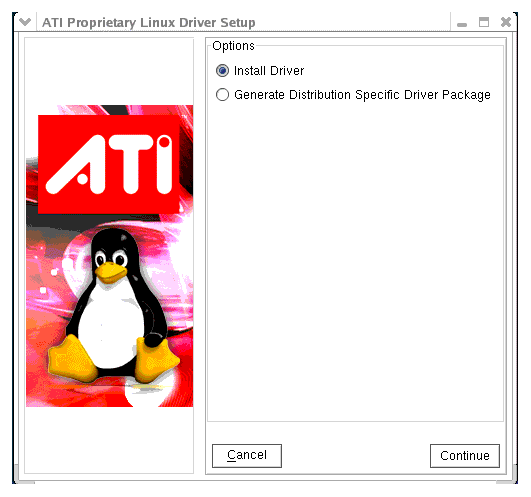
  1. Select Install Driver and click Continue. The ATI License Agreement is displayed.
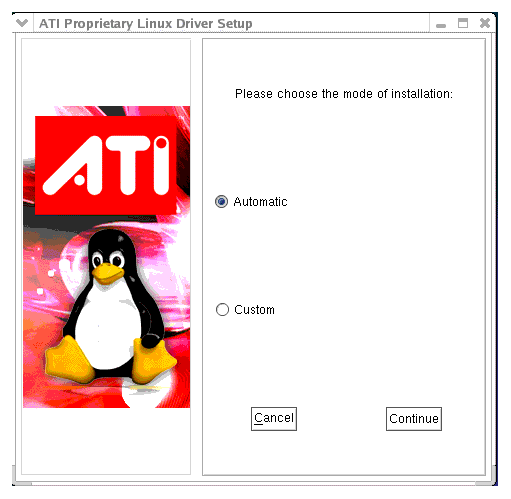
  2. Read the License Agreement and Click I Agree to continue the installation, or Cancel to terminate the installation. The Mode of Installation Dialog Box is displayed.
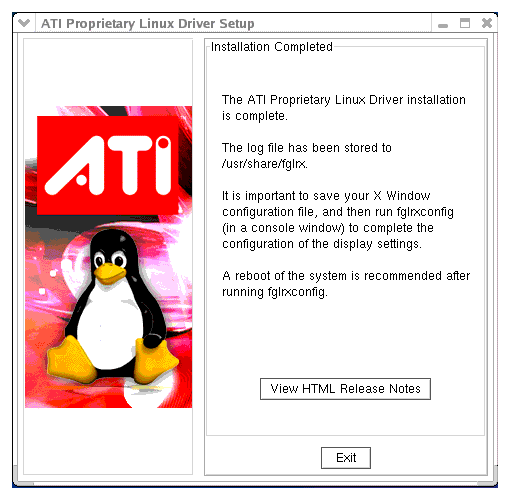
  3. Select Automatic and click Continue. The ATI Proprietary Linux Driver is installed, and the Installation Complete Dialog box is displayed.
  4. Click View HTML Release Note for last minute driver information, or Exit to close the ATI Proprietary Linux Driver Installer.
  5. Launch the Terminal Application/Window and run /usr/X11R6/bin/fglrxconfig to configure the driver.
  6. Reboot your system.
You have successfully installed the ATI Proprietary Linux Driver.

Where it says you need to be a 'super user' just prefix the command with sudo and then put in your password when asked for it.


---------- Post added at 15:09 ---------- Previous post was at 15:09 ----------

Oh, and that was taken from:

http://www2.ati.com/drivers/linux/linux_8.16.20.html

You may need to tweak it a little if you're using a different version of the driver, but they should all have their own installers.
Raistlin is offline   Reply With Quote
Old 20-03-2009, 14:20   #7
zing_deleted
Guest
 
Posts: n/a
Re: Ubuntu revisited

yeah I seen all that but it says first navigate to the package but how do I get to desktop?

I got a terminal window with ******@ubuntu:~$
  Reply With Quote
Old 20-03-2009, 14:24   #8
Raistlin
Inactive
 
Join Date: Feb 2004
Location: There's no place like 127.0.0.1
Services: Depends on the person and the price they're offering
Posts: 12,384
Raistlin is seeing silvered starsRaistlin is seeing silvered starsRaistlin is seeing silvered stars
Raistlin is seeing silvered starsRaistlin is seeing silvered starsRaistlin is seeing silvered starsRaistlin is seeing silvered starsRaistlin is seeing silvered starsRaistlin is seeing silvered starsRaistlin is seeing silvered starsRaistlin is seeing silvered starsRaistlin is seeing silvered starsRaistlin is seeing silvered starsRaistlin is seeing silvered starsRaistlin is seeing silvered stars
Re: Ubuntu revisited

Code:
cd
Is used for changing directory in Linux as it is in Windows.

The Desktop folder is part of your profile, so you would want to issue:

Code:
cd /home/username/Desktop/
If you then type:

Code:
ls -la
You should get a directory listing (ls on its own will list the directory contents, but -la will give you a nicely formatted output).

While you're typing commands if you hit 'tab' it will autocomplete, so to save time you could do:

Code:
cd /ho[tab]/user[tab]/De[tab]/
.....and save yourself some keystrokes
Raistlin is offline   Reply With Quote
Old 20-03-2009, 14:27   #9
zing_deleted
Guest
 
Posts: n/a
Re: Ubuntu revisited

ok gimmi a week lol

yeah that was easy enough to follow got to the installer
  Reply With Quote
Old 20-03-2009, 14:28   #10
Raistlin
Inactive
 
Join Date: Feb 2004
Location: There's no place like 127.0.0.1
Services: Depends on the person and the price they're offering
Posts: 12,384
Raistlin is seeing silvered starsRaistlin is seeing silvered starsRaistlin is seeing silvered stars
Raistlin is seeing silvered starsRaistlin is seeing silvered starsRaistlin is seeing silvered starsRaistlin is seeing silvered starsRaistlin is seeing silvered starsRaistlin is seeing silvered starsRaistlin is seeing silvered starsRaistlin is seeing silvered starsRaistlin is seeing silvered starsRaistlin is seeing silvered starsRaistlin is seeing silvered starsRaistlin is seeing silvered stars
Re: Ubuntu revisited


It's not that much different from the Win command line, just different syntax

You'll be fine

---------- Post added at 15:28 ---------- Previous post was at 15:27 ----------

I'm trying to do this from memory BTW, not at a linux machine at the moment.....
Raistlin is offline   Reply With Quote
Old 20-03-2009, 14:36   #11
zing_deleted
Guest
 
Posts: n/a
Re: Ubuntu revisited

yeah dude that appears to have sorted the video

Right what do you recommend for img and iso file burning and dvd video burning
  Reply With Quote
Old 20-03-2009, 14:38   #12
Raistlin
Inactive
 
Join Date: Feb 2004
Location: There's no place like 127.0.0.1
Services: Depends on the person and the price they're offering
Posts: 12,384
Raistlin is seeing silvered starsRaistlin is seeing silvered starsRaistlin is seeing silvered stars
Raistlin is seeing silvered starsRaistlin is seeing silvered starsRaistlin is seeing silvered starsRaistlin is seeing silvered starsRaistlin is seeing silvered starsRaistlin is seeing silvered starsRaistlin is seeing silvered starsRaistlin is seeing silvered starsRaistlin is seeing silvered starsRaistlin is seeing silvered starsRaistlin is seeing silvered starsRaistlin is seeing silvered stars
Re: Ubuntu revisited

Last time I looked Ubuntu burned images/iso files natively (right clik on the file and see if there's an option to burn image to disc).

Not sure about DVD video burning though.
Raistlin is offline   Reply With Quote
Old 20-03-2009, 14:42   #13
zing_deleted
Guest
 
Posts: n/a
Re: Ubuntu revisited

thanks again

brasero appears to do the images but I have to rename the extension on img to iso
  Reply With Quote
Old 20-03-2009, 14:44   #14
Raistlin
Inactive
 
Join Date: Feb 2004
Location: There's no place like 127.0.0.1
Services: Depends on the person and the price they're offering
Posts: 12,384
Raistlin is seeing silvered starsRaistlin is seeing silvered starsRaistlin is seeing silvered stars
Raistlin is seeing silvered starsRaistlin is seeing silvered starsRaistlin is seeing silvered starsRaistlin is seeing silvered starsRaistlin is seeing silvered starsRaistlin is seeing silvered starsRaistlin is seeing silvered starsRaistlin is seeing silvered starsRaistlin is seeing silvered starsRaistlin is seeing silvered starsRaistlin is seeing silvered starsRaistlin is seeing silvered stars
Re: Ubuntu revisited

No worries.

Raistlin is offline   Reply With Quote
Old 20-03-2009, 14:53   #15
Milambar
Inactive
 
Join Date: Jan 2008
Posts: 954
Milambar has a reputation beyond reputeMilambar has a reputation beyond reputeMilambar has a reputation beyond reputeMilambar has a reputation beyond reputeMilambar has a reputation beyond reputeMilambar has a reputation beyond reputeMilambar has a reputation beyond reputeMilambar has a reputation beyond reputeMilambar has a reputation beyond reputeMilambar has a reputation beyond reputeMilambar has a reputation beyond reputeMilambar has a reputation beyond reputeMilambar has a reputation beyond repute
Re: Ubuntu revisited

I prefer k3b for cd and dvd image burning.
Milambar is offline   Reply With Quote
Reply

Thread Tools

Posting Rules
You may not post new threads
You may not post replies
You may not post attachments
You may not edit your posts

BB code is On
Smilies are On
[IMG] code is On
HTML code is Off

Forum Jump


All times are GMT. The time now is 12:38.


Server: lithium.zmnt.uk
Powered by vBulletin® Version 3.8.11
Copyright ©2000 - 2026, vBulletin Solutions Inc.
All Posts and Content are © Cable Forum