13-04-2012, 10:15
|
#1
|
|
Inactive
Join Date: Apr 2012
Posts: 10
|
60mb upgrade
Yesterday I got upgraded to 60MB internet and the engineer said it would take up to 24hours until I get them speeds. But now it has been 24hours and the best speed I can get from the wireless is 10-12mbps and from the wired connection I can get 30mbps. Is there anything I could check on the superhub it self to make sure its working properly.
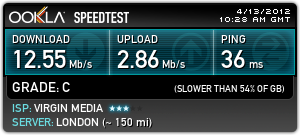 http://www.speedtest.bbmax.co.uk/res...007&v=15535975
|

|

|
|
13-04-2012, 10:54
|
#2
|
|
XIV
Join Date: Dec 2009
Location: Crawley
Age: 36
Services: Three Unlimited
Posts: 16,931
|
Re: 60mb upgrade
could you post up your connection stats.
log into your SH. put this into your web browser and hit enter
192.168.100.1
login defaults...
username: admin
password: changeme
click on advanced settings below the 3 box
then connection within the left hand column.
__________________
“Never ask a liar why they lied. To explain it, they'd have to lie again”
Fernando Hidalgo
|

|
|
|
13-04-2012, 10:55
|
#3
|
|
Inactive
Join Date: Apr 2012
Services: Virgin Media 60MB XL Broadband, XL TV with TiVo, XL phone.
Posts: 44
|
Re: 60mb upgrade
Quote:
Originally Posted by Killerbob

Yesterday I got upgraded to 60MB internet and the engineer said it would take up to 24hours until I get them speeds.
|
Complete and utter rubbish! You should get the correct speeds as soon as theyve sent the new config through. Mine was upped from 10 to 60 yesterday and I instantly started getting 60 meg while the engineer was still here.
I see your upload speed is correct. Try rebooting the modem again, and if your using your own router, remove it and try connecting the superhub straight into the pc to eliminate your router as the problem. For the record Im running my superhub in modem mode with my own buffalo 300Mbps N router.
Cheers
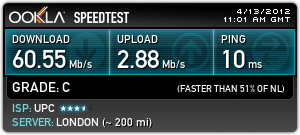
|
|
|
|
|
13-04-2012, 10:57
|
#4
|
|
Inactive
Join Date: Apr 2012
Posts: 10
|
Re: 60mb upgrade
Startup Procedure
Procedure Status Comment
Acquire Downstream Channel 299000000 Hz Locked
Connectivity State OK Operational
Boot State OK Operational
Configuration File OK
Security Enabled BPI+
Downstream Channels
Lock Status Modulation Channel ID Max Raw Bit Rate Frequency Power SNR Docsis/EuroDocsis locked
Locked QAM256 50 55616000 Kbits/sec 299000000 Hz -3.7 dBmV 38.4 dB Hybrid
Locked QAM256 51 55616000 Kbits/sec 307000000 Hz -4.1 dBmV 38.3 dB Hybrid
Locked QAM256 52 55616000 Kbits/sec 315000000 Hz -4.5 dBmV 38.1 dB Hybrid
Locked QAM256 53 55616000 Kbits/sec 323000000 Hz -4.8 dBmV 38.0 dB Hybrid
Unlocked Unknown 0 0 Ksym/sec 0 Hz 0.0 dBmV 0.0 dB Unknown
Unlocked Unknown 0 0 Ksym/sec 0 Hz 0.0 dBmV 0.0 dB Unknown
Unlocked Unknown 0 0 Ksym/sec 0 Hz 0.0 dBmV 0.0 dB Unknown
Unlocked Unknown 0 0 Ksym/sec 0 Hz 0.0 dBmV 0.0 dB Unknown
Upstream Channels
Lock Status Modulation Channel ID Max Raw Bit Rate Frequency Power
Locked ATDMA 4 20480 Kbits/sec 45800000 Hz 47.5 dBmV
Unlocked Unknown 0 0 Ksym/sec 0 Hz 0.0 dBmV
Unlocked Unknown 0 0 Ksym/sec 0 Hz 0.0 dBmV
Unlocked Unknown 0 0 Ksym/sec 0 Hz 0.0 dBmV
Primary Downstream Service Flow
Downstream(0)
SFID 25960
Max Traffic Rate 66000000 bps
Max Traffic Burst 10000 bytes
Mix Traffic Rate 0 bps
Primary Upstream Service Flow
Upstream(0)
SFID 2389
Max Traffic Rate 3072000 bps
Max Traffic Burst 8160 bytes
Mix Traffic Rate 0 bps
Max Concatenated Burst 8160 bytes
Scheduling Type Best Effort
Current System Time:Fri Apr 13 10:57:24 2012
|
|
|
|
|
13-04-2012, 11:06
|
#5
|
|
XIV
Join Date: Dec 2009
Location: Crawley
Age: 36
Services: Three Unlimited
Posts: 16,931
|
Re: 60mb upgrade
your on 60meg.
when testing max speeds do it via ethernet not wireless. try > www.speedtester.bt.com/
whats the specs of your wired desktop system? and laptop?
download inSSIDer onto a wireless capable device/laptop and run the program. itll scan for all reachable networks. note which channel each uses then set your network to use a channel that isnt in use. the channel numbers will range from 1-13.
www.metageek.net/products/inssider/
----
to change wireless channels on the SH...
log into your SH. put this into your web browser and hit enter
192.168.100.1
login defaults...
username: admin
password: changeme
click on advanced settings below the 3 box
then wireless settings within the left hand column.
also test changing mode from 300 to 145.
__________________
“Never ask a liar why they lied. To explain it, they'd have to lie again”
Fernando Hidalgo
|
|
|
|
|
13-04-2012, 11:07
|
#6
|
|
Inactive
Join Date: Apr 2012
Services: Virgin Media 60MB XL Broadband, XL TV with TiVo, XL phone.
Posts: 44
|
Re: 60mb upgrade
Downstream power could be a little better, optimum is above -3 dBmV, but I dought thats causing the low speeds since your well within tolerance.
|
|
|
|
|
13-04-2012, 11:10
|
#7
|
|
XIV
Join Date: Dec 2009
Location: Crawley
Age: 36
Services: Three Unlimited
Posts: 16,931
|
Re: 60mb upgrade
could be.. may be 
__________________
“Never ask a liar why they lied. To explain it, they'd have to lie again”
Fernando Hidalgo
|
|
|
|
|
13-04-2012, 11:56
|
#8
|
|
Inactive
Join Date: Apr 2012
Posts: 10
|
Re: 60mb upgrade
On my wired computer i get a constant 62mpbs now after changing nothing and I changed upto 300mbps to 145mbps and can get 20mbps on wireless which is still no where near
|
|
|
|
|
13-04-2012, 11:58
|
#9
|
|
XIV
Join Date: Dec 2009
Location: Crawley
Age: 36
Services: Three Unlimited
Posts: 16,931
|
Re: 60mb upgrade
did you change the wireless channel to one that isnt in use? try 13.
whats your laptop specs?
__________________
“Never ask a liar why they lied. To explain it, they'd have to lie again”
Fernando Hidalgo
|
|
|
|
|
13-04-2012, 12:03
|
#10
|
|
Inactive
Join Date: Apr 2012
Posts: 10
|
Re: 60mb upgrade
Im using a wireless usb for my computer. I just changed the channel to 13 and made the speed go down to 14mbps.
Do you mean processor, graphics card etc specs?
|
|
|
|
|
13-04-2012, 12:10
|
#11
|
|
XIV
Join Date: Dec 2009
Location: Crawley
Age: 36
Services: Three Unlimited
Posts: 16,931
|
Re: 60mb upgrade
what adapter you got, whats the wireless strength and yes those specs please
__________________
“Never ask a liar why they lied. To explain it, they'd have to lie again”
Fernando Hidalgo
|
|
|
|
|
13-04-2012, 12:23
|
#12
|
|
Inactive
Join Date: Apr 2012
Posts: 10
|
Re: 60mb upgrade
Windows 7 64bit
Intel Core 2 Quad CPU @2.66GHz
4.00GB RAM
Nvidia 250gtx geforce
Sitecom wireless networking 54g usb adapter 54g wl-608 Signal strength Excellent
|
|
|
|
|
13-04-2012, 12:25
|
#13
|
|
XIV
Join Date: Dec 2009
Location: Crawley
Age: 36
Services: Three Unlimited
Posts: 16,931
|
Re: 60mb upgrade
call VM and ask for the free wireless USB adapter
__________________
“Never ask a liar why they lied. To explain it, they'd have to lie again”
Fernando Hidalgo
|
|
|
|
|
13-04-2012, 12:27
|
#14
|
|
Inactive
Join Date: Apr 2012
Posts: 10
|
Re: 60mb upgrade
Ok, I have tested all channels and channel 6 seems to be the best for me and I have changed it from 300mpbs to 145mpbs and can now get 25.97mbps so far
|
|
|
|
|
13-04-2012, 14:57
|
#15
|
|
Inactive
Join Date: Apr 2012
Posts: 10
|
Re: 60mb upgrade
I have been monitoring the quality of my broadband since this morning and so far it is this.
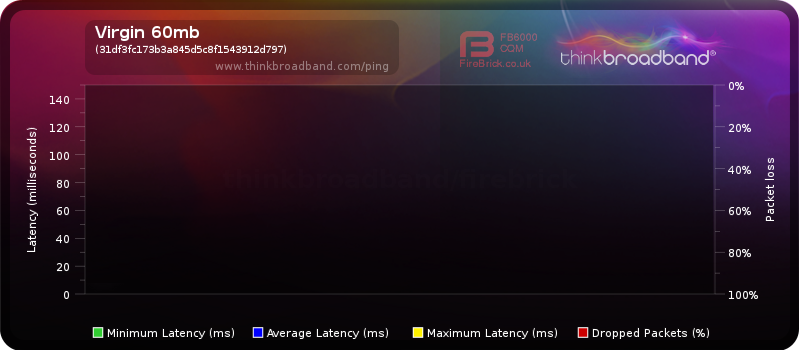
I think the big red lines are when I turned my router off to change settings but im not sure.
|
|
|
|
 Posting Rules
|
You may not post new threads
You may not post replies
You may not post attachments
You may not edit your posts
HTML code is Off
|
|
|
All times are GMT. The time now is 12:25.
|

 Join CF
 You are here: